> For the complete documentation index, see [llms.txt](https://learn.mechanic.dev/llms.txt). Markdown versions of documentation pages are available by appending `.md` to page URLs; this page is available as [Markdown](https://learn.mechanic.dev/techniques/batch-processing-of-events.md).
# Batch processing of events
Replace high-frequency Shopify webhook subscriptions with scheduled GraphQL scans to reduce queue volume and improve reliability.
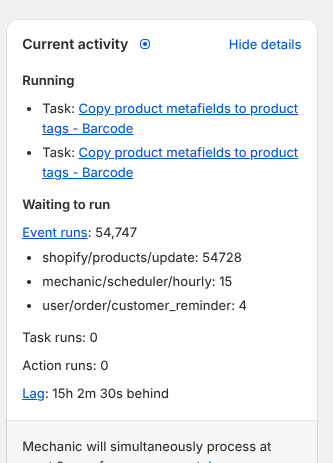
If your shop has a trigger event that fires incessantly (looking at you `products/update`) due to some combination of high volume operations, extensive task usage of the same event topic, and tasks that make updates to the same object types they are listening to update events for, then your affected tasks are likely good candidates for batch processing optimization.
{% hint style="info" %}
Since the aforementioned `products/update` event is typically the primary culprit in many shops, this technique will concentrate on mitigating its usage. However, this technique could be applied to any other objects that have an excessive amount of update events.
{% endhint %}
Original automation criteria:
* Task should listen for product creation
* Task should listen for product updates
* Task will update the product in some way
* \~10 thousand active products
* \~500 orders / day
* A 3rd party integration updates the products in bulk at irregular schedules
* These updates often include information relevant to this automation
A single task developed with this criteria would very likely have no problem efficiently processing the expected volume of `product/update` events that would be generated by sales, the 3rd party integration, and its own updates to products (provided that techniques like [Preventing action loops](/techniques/preventing-action-loops.md) and [Writing a high-quality task](/techniques/writing-a-high-quality-task.md) are adhered to).
Over time though, there may be more tasks added that operate with similar criteria, the sales volume hopefully increases (:heart:), the product catalog might expand, and additional apps and integrations will likely be making their own product updates.
This can lead to the dreaded jammed queue.
{% hint style="success" %}
The main strategy to avoiding this traffic jam is to refactor the task(s) that are affected and/or have some culpability.
{% endhint %}
Some good questions to answer before refactoring a task:
* What level of immediacy is **actually** needed by this task for processing updated products? (i.e. what is the longest acceptable interval between scheduled task runs?)
* How many products on average would be updated in this interval?
If a task can get away with a daily scheduled run to process all recently updated products, then using [bulk operations](/core/shopify/bulk-operations.md) might be a good idea. With this approach the task could optionally continue to listen on `products/create` if that is useful (i.e. this specific task would do useful work on a newly created product).
### Task scenario
Let's instead assume that a high-level of immediacy is desired for this exercise, and go with the most frequent 10 minute scheduler option. With this approach there generally isn't a need to include a `products/create` event due to the frequency of scheduled task runs.
Below is how a skeleton task might look for this scenario *prior to refactoring*. Note that this task already has a manually triggered event that includes paginated querying of up to 25 thousand products. Manually triggered events are typically used for initial task setup, or when massive bulk changes are expected across the product catalog (and the automation will proactively be disabled for that duration :wink:).
{% code title="Subscriptions" %}
```
shopify/products/create
shopify/products/update
mechanic/user/trigger
```
{% endcode %}
{% code title="Code (original)" lineNumbers="true" fullWidth="false" %}
```liquid
{% assign tag_to_add = "testing" %}
{% if event.topic == "shopify/products/create" or event.topic == "shopify/products/update" %}
{% capture query %}
query {
product(id: {{ product.admin_graphql_api_id | json }}) {
id
tags
}
}
{% endcapture %}
{% assign result = query | shopify %}
{% assign products = array | push: result.data.product %}
{% elsif event.topic == "mechanic/user/trigger" %}
{% assign cursor = nil %}
{% assign products = array %}
{% for n in (1..100) %}
{% capture query %}
query {
products(
first: 250
after: {{ cursor | json }}
) {
pageInfo {
hasNextPage
endCursor
}
nodes {
id
tags
# Add fields as needed
}
}
}
{% endcapture %}
{% assign result = query | shopify %}
{% assign products
= result.data.products.nodes
| default: array
| concat: products
%}
{% if result.data.products.pageInfo.hasNextPage %}
{% assign cursor = result.data.products.pageInfo.endCursor %}
{% else %}
{% break %}
{% endif %}
{% endfor %}
{% endif %}
{% if event.preview %}
{% capture products_json %}
[
{
"id": "gid://shopify/Product/1234567890",
"tags": ["These are not", "the tags you", "are looking for"]
}
]
{% endcapture %}
{% assign products = products_json | parse_json %}
{% endif %}
{% for product in products %}
{% assign product_qualifies = nil %}
{% comment %}
-- product qualifying logic would be here
{% endcomment %}
{% if product_qualifies %}
{% action "shopify" %}
mutation {
tagsAdd(
id: {{ product.id | json }}
tags: {{ tag_to_add | json }}
) {
node {
... on Product {
id
title
tags_after_add: tags
}
}
userErrors {
field
message
}
}
}
{% endaction %}
{% endif %}
{% endfor %}
```
{% endcode %}
### Refactoring the task
To convert the above task code to a much more queue-friendly version, the following steps would be taken:
* Remove the `products/create` and `products/update` listener block
* Convert the manual trigger block to an `if` statement and add a `contains` check for any `mechanic/scheduler` event
* Add Mechanic cache checking and setting using the last task run time
* (Optionally) Add task configuration to allow manual runs to process all active products, or some subset larger than the amount in a typically interval
{% hint style="success" %}
**The caching step is the key in this technique.** It allows the task to review a **significantly** smaller count of products on each (frequent) run. In fact, many runs might have no work to do, and that is but a blip in stream of queue happiness.
{% endhint %}
The refactored task is below, which includes an option to query all products on manual runs. Importantly, when that option is enabled, this task will not schedule events, to avoid potential race conditions between task runs.
{% hint style="warning" %}
When add a manual run option that can process a very large amount of products, you should consider disabling the scheduled events, to avoid potential race conditions between task runs.
{% endhint %}
{% code title="Subscriptions" %}
```liquid
{% unless options.query_all_active_products_on_manual_runs__boolean %}
mechanic/scheduler/10min
{% endunless %}
mechanic/user/trigger
```
{% endcode %}
{% code title="Code (refactored)" lineNumbers="true" %}
```liquid
{% assign tag_to_add = "testing" %}
{% if event.topic == "mechanic/user/trigger" or event.topic contains "mechanic/scheduler/" %}
{% comment %}
-- get all products updated since last task run time; default to beginning of previous day
{% endcomment %}
{% assign cache_key = "last_run_time_for_task_" | append: task.id %}
{% assign now_utc = "now" | date: "%Y-%m-%dT%H:%M:%SZ", tz: "UTC" %}
{% assign yesterday_utc = "now - 1 day" | date: "%F" | date: "%Y-%m-%dT%H:%M:%SZ", tz: "UTC" %}
{% assign last_run_time = cache[cache_key] | default: yesterday_utc %}
{% log
now_utc: now_utc,
yesterday_utc: yesterday_utc,
last_run_time: last_run_time
%}
{% action "cache", "set", cache_key, now_utc %}
{%- capture search_query -%}
updated_at:>{{ last_run_time | json }}
{%- endcapture -%}
{% if event.topic == "mechanic/user/trigger" and options.query_all_active_products_on_manual_runs__boolean %}
{% assign search_query = "status:active" %}
{% endif %}
{% assign cursor = nil %}
{% assign products = array %}
{% for n in (1..100) %}
{% capture query %}
query {
products(
first: 250
after: {{ cursor | json }}
query: {{ search_query | json }}
) {
pageInfo {
hasNextPage
endCursor
}
nodes {
id
tags
# Add fields as needed
}
}
}
{% endcapture %}
{% assign result = query | shopify %}
{% if event.preview %}
{% capture result_json %}
{
"data": {
"products": {
"nodes": [
{
"id": "gid://shopify/Product/1234567890",
"tags": ["These are not", "the tags you", "are looking for"]
}
]
}
}
}
{% endcapture %}
{% assign result = result_json | parse_json %}
{% endif %}
{% assign products = products | concat: result.data.products.nodes %}
{% if result.data.products.pageInfo.hasNextPage %}
{% assign cursor = result.data.products.pageInfo.endCursor %}
{% else %}
{% break %}
{% endif %}
{% endfor %}
{% log count_products_reviewed_in_this_task_run: products.size %}
{% for product in products %}
{% assign product_qualifies = nil %}
{% comment %}
-- product qualifying logic would be here
{% endcomment %}
{% if product_qualifies %}
{% action "shopify" %}
mutation {
tagsAdd(
id: {{ product.id | json }}
tags: {{ tag_to_add | json }}
) {
node {
... on Product {
id
title
tags_after_add: tags
}
}
userErrors {
field
message
}
}
}
{% endaction %}
{% endif %}
{% endfor %}
{% endif %}
```
{% endcode %}
---
# Agent Instructions
This documentation is published with GitBook. GitBook is the documentation platform designed so that both humans and AI agents can read, navigate, and reason over technical content effectively. Learn more at gitbook.com.
## Querying This Documentation
If you need additional information that is not directly available in this page, you can query the documentation by asking a question.
Perform an HTTP GET request on the following URL with the `ask` and `goal` query parameters:
```
GET https://learn.mechanic.dev/techniques/batch-processing-of-events.md?ask=&goal=
```
`ask` is the immediate question: it should be specific, self-contained, and written in natural language.
`goal` is what the user is ultimately trying to achieve, the reason they need the answer. Sharing it helps GitBook give you a better, more relevant answer. A goal is most helpful when it describes the outcome the user wants rather than restating the question. For example, with `ask=how do I create an API token`, a goal like `automate deployments from our CI pipeline` lets GitBook tailor the answer to that use case.
The response will contain a direct answer to the question and relevant excerpts and sources from the documentation.
Use this mechanism when the answer is not explicitly present in the current page, you need clarification or additional context, or you want to retrieve related documentation sections.